https://chickenofthesea.com/seafood-recipes/tuna-casserole-recipe/
Tuesday, October 20, 2026

Monday, October 19, 2026
The Trump Card: Zilog Z8000 Coprocessor card for the IBM PC – Dr. Scott M. Baker
https://www.smbaker.com/the-trump-card-zilog-z8000-comprocessor-card-for-the-ibm-pc
Sunday, October 18, 2026
M1 Garand Firearm Maintenance: Part 1 Disassembly - Brownells
The first in a series -
Comments on FB - if slides, grease it, if it rotates, oil it.
PC-based IBM mainframe-compatible systems
Mainframe emulator cards for PCs are essentially no longer available or practical. It doesn't appear that any PCI or PCIe bus cards were ever produced, and the ISA cards don't show up on eBay.
This is presumably because the software emulators work well enough:
"Popular Software Emulators
- Hercules: A widely used emulator that can simulate IBM mainframe environments, allowing users to run various mainframe operating systems. https://en.wikipedia.org/wiki/Hercules_(emulator)
- QEMU: Another emulator that supports running mainframe hardware, particularly useful for Linux environments." https://en.wikipedia.org/wiki/QEMU
https://www.jaymoseley.com/hercules/ -
| "Hercules by itself only provides the implementation of the hardware instruction set of IBM mainframe architectures, S/370, ESA/390, and z/390. In order to utilize Hercules, it is necessary to acquire either an operating system or a stand-alone program that has been designed to run on IBM mainframe hardware. Like the hardware itself, the operating system software that runs mainframe computers is prohibitively expensive. However, there are older versions of several of IBM's popular operating systems that are now classified as Public Domain, meaning that they may be obtained and utilized freely. | |
[Click for larger image/information] |
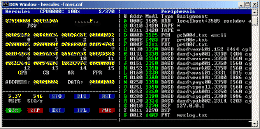
| The Hercules community runs a variety of vintage IBM mainframe operating systems which have been determined to be in the public domain, including MVT release 21.8, MVS release 3.8, DOS/VS release 34, and VM370 R6 (all from the 1970's time period). Linux/390 by its very nature is publicly available. Under the disaster recovery provisions of their licenses, some have successfully run more recent operating systems on their Hercules enabled systems." |
#3270, #MVS, #IBM, #REXX, #JCL, #TSO, #SPF
Wednesday, October 14, 2026
What can I use a Thin Client for at home
My main desktop PC has enough power to virtualize Proxmox, a media server, and an AI engine, along with some other tools. It's being wasted just surfing the web and playing Internet radio. I'm looking at setting up a Thin Client or two that can connect to this desktop and perform useful work.
"A thin client is a compact, low-power endpoint designed to display a virtual desktop streamed from a central server, cloud workspace, or remote PC. Instead of running apps locally, it offloads the heavy lifting to a remote machine and just handles the display, keyboard, and mouse on its end. "
https://www.thinvent.in/a/thinclient-at-home (vendor site):
Low Power Bills: A thin client consumes as little as 5–10 watts — compared to 60–150 watts for a desktop PC. Over a year of typical use, you save a significant amount on your electricity bill.
No Noise, No Heat: Many Thin Clients use fanless designs. It is well suited to a bedroom, study, or living room where noise would be disruptive.
Little to Break or Maintain: Thin clients use solid-state flash storage and have few or no moving parts.
Virus and Malware Resistant: Thinvent's Thinux OS is a read-only embedded Linux. Users cannot accidentally install malware or adware on the read-only system.
Small and Unobtrusive: A thin client is roughly the size of a thick book. It fits behind a monitor, on a shelf, or in a TV cabinet. Many models include VESA mount brackets so they can be attached directly to the back of a monitor.
Common Home Use Cases: Remote Desktop and Work From Home
Everyday Computing: Web browsing, email, video calls (Zoom, Google Meet, Teams), YouTube, streaming, online banking — all of these work well on a thin client. For most home users who do not edit video or play games, a thin client handles everything they need.
Children's Study Computer: A thin client running a read-only OS makes a good study computer.
Home Media Center: Connect a thin client to your TV via HDMI and use it as a media player. Stream from YouTube, Netflix, or a home media server. The silent fanless design suits a living room setup.
https://www.reddit.com/r/HomeServer/comments/znhpi5/thin_client_for_use_as_a_low_budget_home_server/:
"Don't limit yourself to thin clients - consider older generation USFF PCs. I run a trio of HP 260s as my hypervisors - collectively they draw about 20W, but each one has 8 or 16GB RAM and either a SATA HDD or SSD. I got 2 of them together for about £30 each. The EliteDesk 800 series is the successor and should also be available pretty cheap.
I don't think you'd get a hypervisor on a thin client with a Celeron - performance would likely be very poor. My HPs are Haswell i3s and can crunch numbers if needed. The N2807 in the 3030 you picked is of similar vintage (2014) but does not have VT-d, whereas the i3-4030Us in my HPs do.
You'll also be very limited on RAM with a thin client - the RAM is generally not upgradable and quite low for the rest of the system. USFFs are usually socketed."
" Well, thanks for the input people. I think I narrowed down to this two:
- Dell Wyse Thin Client Dx0Q
- HP t620 Quad Core
The HP one comes with a SSD and the Dell does not, and both don't come with a power supply so I will need to buy it separately. In this regard the HP one wins, because of wide availability of PSU and the power supply of my HP notebook works with it.
RAM on the HP can be expanded up to 32 GB according to Parkytowers site: https://www.parkytowers.me.uk/thin/hp/t620/ and is easier than the Dell Wyse Thin Client Dx0Q: https://www.parkytowers.me.uk/thin/wyse/d/dx0q/
I plan to upgrade the SSD and RAM in the future if performance is good enough to merit an upgrade.
But my doubt is how much storage I will need to host the hypervisor minimum?. I've read Proxmox needs 3GB for the OS itself and XCP-ng needs 46GB to 70GB minimum. I don't know if this thin clients can boot from external attached storage through USB3 for example?"
"I booted my T620 off a thumb drive to load Debian/Octoprint on it, so it will boot from USB. I also upgraded the internal SSD to a 250GB."
Raspberry Pi prices are out of hand, and this $50 thin client makes a better home server:
https://www.xda-developers.com/this-mini-pc-is-cheaper-and-better-than-a-raspberry-pi-for-homelabs/
https://www.howtogeek.com/the-50-pc-thats-quietly-replacing-raspberry-pis-in-homelabs/:
"The thin client I purchased is an HP t620 model that was available for around $15 without memory and storage. It's similar to the Raspberry Pi Zero 2 W's original price. I purchased an 8GB DDR3 memory stick along with a 128GB SATA SSD for almost $35. So, I had to pay around $50 for a complete, usable computer."
"... any SBC with one-gigabyte memory, no matter how fast its bandwidth is, will barely suffice considering today’s standards. If you compare it to my setup, which has 8GB of memory, the price seems horrible. The 4GB memory models of both Raspberry Pi boards cross the $100 mark, and this is without any peripherals."
"My HP t620 has better connectivity than most of the SBCs available today. It has multiple USB ports, Ethernet, display ports, and all the other necessary connection inputs, along with a speaker."
"The thin client supports M.2 SATA SSDs of multiple form factors and can handle up to 16GB of RAM in a dual-channel configuration. So, I can upgrade the storage without purchasing additional connection modules, as I need for an SBC. I can also boost the memory capacity when my self-hosted setup demands more. As you expand your self-hosted tool library, the additional memory capacity makes it feasible to use the same computer for more demanding tasks."
"A thin client like the HP t620 won’t use more than 15 watts under stress, and that’s less than one percent of my annual bill amount."
"Plus, with a thin client, you can install any modern operating system, from Linux to Windows, which is something that the Raspberry Pi just simply can't compete with."
10 Best Thin Clients (October 2026) Tested & Reviewed: https://www.thirstybear.com/best-thin-clients/
12 Best Thin Clients (October 2026) Expert VDI Reviews: https://acfc.org/best-thin-clients/
"The best thin clients today are not the bulky Wyse boxes from a decade ago. They are quiet, fanless mini PCs that sip 4 to 15 watts of power, boot in under 20 seconds, and connect cleanly to Citrix, VMware Horizon, Azure Virtual Desktop, and Windows 365."
"The 6th generation i5-6500T processor handles dual 4K streams over HDMI and DisplayPort without breaking a sweat. I had two spreadsheets, a 1080p video call, and three Chrome tabs open across both monitors and never saw the CPU climb above 35%. Sixteen gigabytes of DDR4 RAM is generous for a thin client and gives you headroom for heavy browser-based workloads."
"The 256GB SSD is fast for boot times but tight for anything beyond thin client duties. If you plan to use this as a general productivity machine, swap in a larger NVMe drive later."
"The integrated Intel HD Graphics 530 is sufficient for knowledge worker workloads including Microsoft 365 apps, web based SaaS tools, and light content editing."
Thin Clienting at Home (March 2010): https://www.instructables.com/Thin-Clienting-at-home/
"A thin client is basically a stripped down computer that is used as a window to the Terminal Server, some use complex platforms to connect to the server, but today I am using RDP because that was the easiest for me (and cheapest)."
Thin Client examples: https://forums.servethehome.com/index.php?tags/thin-client/:
Monday, October 12, 2026
Using a Raspberry Pi as an Oscilloscope: Hardware, Setup, and Limits | ElectricalFlux
https://electricalflux.com/mcu-projects/raspberry-pi-as-oscilloscope-adc-setup
How to build your own Raspberry Pi Oscilloscope | SB Bytes
https://singleboardbytes.com/707/build-own-raspberry-pi-oscilloscope.htm
PiScope (Raspberry Pi Based Oscilloscope) : 10 Steps - Instructables
https://www.instructables.com/PiScope-Raspberry-Pi-based-Oscilloscope/
Build an oscilloscope using Raspberry Pi and Arduino - Raspberry Pi
https://www.raspberrypi.com/news/build-oscilloscope-raspberry-pi-arduino/
Windows 11 hides a Windows 7 folder that beats the Settings app, and I use it every day
The GodMode hack … https://www.xda-developers.com/windows-11-hides-a-windows-7-folder-that-beats-the-settings-app-and-i-use-it-every-day/
Saturday, October 10, 2026
Tuesday, October 6, 2026
A $58 PCIe card with AMD’s B650 Chipset supports 4 M.2 Slots, a 10 Gbps USB-C Port, & more.
"Another hardware manufacturer has debuted its own Add-in-Card based on the AMD B650 chipset. A few months ago, we heard about such a B650-based AIC by Lekuo, which turned the PCIe slot into several ports. Now, JGINYUE has launched a new B650 AIC that brings AMD's B650 chipset to a PCIe expansion card. It offers additional connectivity for systems that have limited motherboard expansion options."
"... it brings a 6-pin PCIe connector ... the company says it exists to provide auxiliary power for the USB connectivity. JGINYUE recommends using it even when the card is being used only with m.2 SSDs."
Sunday, October 4, 2026
10 Cars That Sold Like Crazy for One Year and Then Vanished Completely – Vehicle HQ
This is a list of some memorable vehicles that ended up not being sold for many years: https://vehq.com/cars-vanished-after-one-year/
Saturday, October 3, 2026
GENIAC Kit Parts List and Modern Rebuild Guide
https://philreichert.org/read/0294-geniac-parts-list.html
Geniac Electric Brain Kit Manual | PDF | Switch | Electrical Wiring
https://www.scribd.com/document/742477245/Geniac-Manual
Friday, October 2, 2026
CMP to Sell Converted M14 Machine Guns to Civilians - The Smoking Gun | The Smoking Gun
M14s are pleasant shooting and historic semi-automatic rifles in 308 Winchester. https://smokinggun.org/cmp-to-sell-converted-m14-machine-guns-to-civilians/
Tuesday, September 29, 2026
GitHub - fritzone/cloudy: For the cloudy infrastructure · GitHub
It’s interesting to see development in DOS to support information exchanges with Linux systems. https://github.com/fritzone/cloudy/?fbclid=IwdGRleAUonBxleHRuA2FlbQIxMQBwZG9mBWZkaWQWUPW1uGSjsb4nl5JFqLaiqDXUhxoiVXNydGMGYXBwX2lkCjY2Mjg1NjgzNzkAAR78OGLwM1Q_6HfbzrHE5FLN0ID25i9FaR77y3NezHO4kiF9vBYJbynbCTP9UQ_aem_ZwmqjQCPkzm9nWhB9b5DwQ
Monday, September 28, 2026
Saturday, September 26, 2026
Crafting Custom Work Tables For Radial Arm Saws: A Comprehensive Guide | ShunTool

https://shuntool.com/article/how-to-build-work-tables-for-radial-arm-saws
"The tabletop is a crucial component of your radial arm saw table. It provides a stable surface for cutting operations and is subject to frequent blade penetration. The ideal tabletop should be made of medium-density fiberboard (MDF) due to its durability, cost-effectiveness, and ease of handling. Plywood is another option but may splinter over time."
"The legs of your work table provide stability and balance. Typically, 2x4 lumber cut into equal lengths will serve as sturdy legs for your table."
"The frame of your work table provides structural integrity and supports the tabletop. It is typically constructed using 2x4 lumber for the length and 1x4 lumber for creating a lip around the tabletop edge."
"The fence is an essential component of your radial arm saw table, providing a guide for the material being cut. It should be installed perpendicular to the vertical plane of the saw blade when set to the cross-cutting position. A recommended material for the fence is a 2.5-inch wide piece of MDF set on edge, providing a straight and durable guide."

Radial Arm Saw Table Plans: Transforming Your Workspace (Crafting Efficiency)
https://toolsradar.com/radial-arm-saw-table-plans-transforming-your-workspace/
"What is the best height for a radial arm saw table in a garage shop?
Aim for 34-36 inches—elbow height when standing. Adjust ±2″ for your stature; my 5’10” frame loves 35″."
Radial Arm Saw Table Plans – Build Your Ultimate Custom Workstation
https://thejimbosliceworkshop.com/radial-arm-saw-table-plans/
"How do I ensure my fence is perfectly square?
To ensure your fence is perfectly square, unplug your saw. Lower the blade to the table surface. Use a high-quality machinist’s square or a known accurate framing square. Place one arm of the square against the blade (with teeth pointing away for safety) and the other against the fence. Adjust the fence until it is perfectly square to the blade’s travel path. Make test cuts on scrap material and measure for true squareness."
Setting Up a Radial Arm Saw : 13 Steps (with Pictures) - Instructables
https://www.instructables.com/Setting-Up-a-Radial-Arm-Saw/
"Power saws go out of alignment through the vibration that accompanies use. Also, radial arm saws do not like to be moved, and settings will probably drift when one is moved. But, a lot depends on how much precision the user is looking to have from his saw. If you plan to use the saw only to cut 2 x 4s to length, the accuracy you need is not the same as if you were doing fine cabinetmaking with the saw."

"This is my homemade stand constructed of 2 x 4 pieces and plywood cleats. I made it to take down easily, so the brace pieces attach with corner brackets and wood screws. I made two tool trays that rest on cleats inside the frame assemblies of the stand."
"Use a good square to check the travel of the blade so it is at 90 degrees to the fence. Pull the motor down the length of the arm. The blade should lightly touch the square the length of travel. Flip the square over and check from the other side of the blade, too."
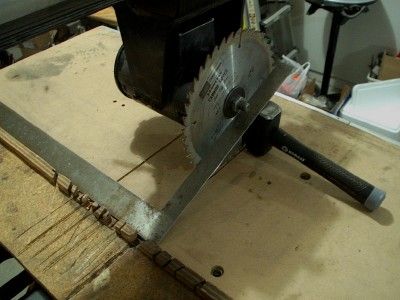
""Heel" means the blade moves through the wood cocked a little to one side. Heel results in burn marks on at least one side of the cut. You can also detect heel when the blade kicks up splinters as it exits the cut at the rear of the cut.
Use a framing square to check for heel. Set one leg against the fence. Bring the other leg against the saw blade. If there is no heel, the square and the saw blade will meet consistently from the front of the blade to the rear. If there is a "V"-shaped gap, the blade has some heel that will need to be removed."
Creating A Sturdy Fence For Your Radial Arm Saw: A Step-By-Step Guide | ShunTool
https://shuntool.com/article/how-to-make-a-fence-for-a-radial-arm-saw
"Materials needed:
- A piece of hardwood or plywood: The length and width of this piece will depend on the size of your radial arm saw. It should be long enough to provide ample support for your work-pieces and wide enough to accommodate the necessary accessories.
- T-track: T-track is a versatile and widely used accessory in woodworking. It consists of a metal track with a T-shaped slot that allows for easy attachment of various accessories, such as fence stops and hold-downs. You will need a length of T-track that matches the width of your fence.
- Bolts and nuts: You will need bolts and nuts to attach the T-track to the hardwood or plywood. Make sure to use bolts and nuts that are compatible with the T-track's mounting holes.
- Measuring tape or ruler: A measuring tape or ruler is necessary for accurately measuring and marking the positions of the T-track and other accessories."
Radial Arm Saw fence - new design - HomemadeTools.net
https://www.homemadetools.net/forum/radial-arm-saw-fence-new-design-39532
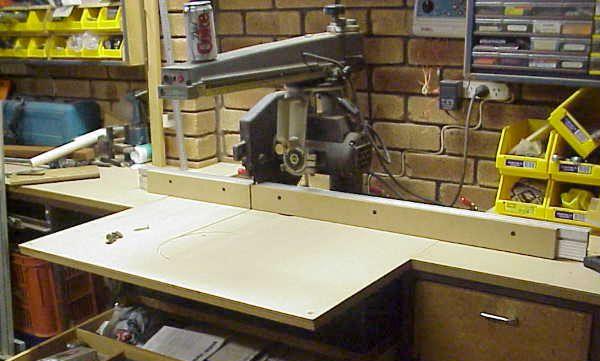
"The new fence design used a “sandwich” of MDF - aluminum extrusion - MDF. This provided some useful benefits."
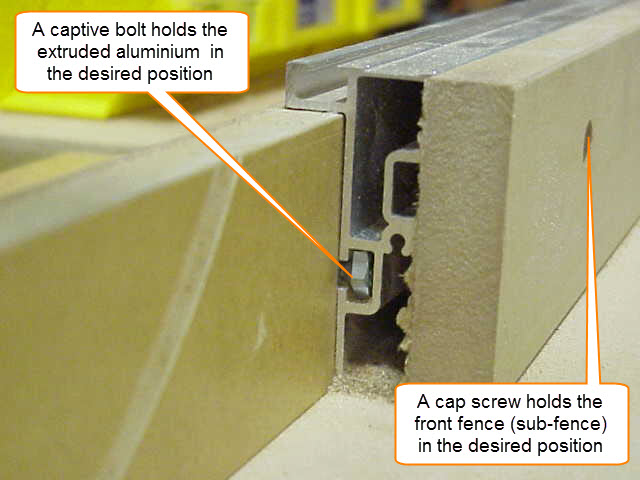
"Both the front piece of MDF (I suppose it could be called a sub-fence) and the aluminum extrusion could be moved and positioned separately. The extruded fence is held in the desired position with captive bolts and the sub-fence is held in place by cap screws. The piece of MDF at the back of the extrusion was the part of the fence that remained clamped to the table (and held the whole fence in place)."
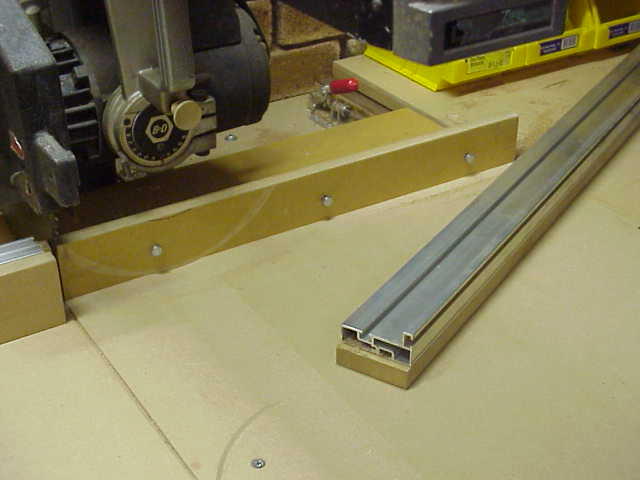
"As you can see in the image (below), the fence can be positioned to suit the angle being cut and the sub-fence could also be “closed” to allow the (MDF) sub-fence to be cut at the angle to which the arm was set, thus creating a zero clearance for the blade at that desired angle.
The extrusion was never cut. The extrusion was only re-positioned conveniently close to the blade to provide strengthening support to the MDF sub-fence.
Sunday, September 20, 2026
Saturday, September 19, 2026
Top 4 DIY Hand Tools to make for woodworking
https://www.facebook.com/share/v/1BmoJnJ6SY/
#1 a measuring stick you can lock into a specific measurement (Marking Gauge).
#2 Similar to #1, but with support for 45 degree angles, and a removable ruler (Routing Groove Jig).
#3 a sanding block.
#4 an easily centered Dowel Drilling Guide with support for corners or straight stock.
Wednesday, September 16, 2026
Grok is now in Copilot - xAI models are being added as subprocessors, giving users another choice in Word, Excel, &PowerPoint
"Microsoft Copilot will soon support Grok models from xAI. Word, Excel, and PowerPoint users in the Microsoft Frontier Program can test Grok models now, with general support expected to roll out in the future."
"Grok models are being added to Microsoft's Online Services Subprocessor list."
" Using Grok as a subprocessor helps Copilot tackle different tasks and provides redundancy that protects against outages or issues with other subprocessors."
"Once an admin enables the integration, you can set Copilot in apps like Word, Excel, and PowerPoint to automatically pick the best model for a task, or manually pick between GPT, Claude, or Grok directly from a drop-down menu in the interface."
Bringing modern USB xHCI support to Windows 98/ME/2K
Everything is open-sourced here if you want to jump right in to use it: https://github.com/yeokm1/xhci98.
"The USB host controller on most modern PCs today is based on the Extensible Host Controller Interface (xHCI) USB 3.0 standard. It was first publicly finalised by Intel in 2010 and is now the de facto standard superseding prior USB host standards. Updates to the standard have been provided over the years with the latest now at 1.2c.
Given its relatively recent introduction, only modern operating systems like Windows 8 onwards natively support it. Supporting older machines will require the chipset vendors to provide the driver stack which is the case back to Windows XP. What if we want to go back further?"
"I wanted to see if I could build a native xHCI driver for Windows 98. Especially with AI assistance today, this should be possible right?"
"usbport.sys is a USB 2.0-era design. It has no concept of SuperSpeed and neither does anything above it. Doing USB 3.0 properly would mean replacing the entire host controller driver (HCD) stack on the operating systems and I doubt many machines using those OSes would benefit from that speed anyway.
Fortunately every USB 3.0 connector also carries the USB 2.0 wires and xHCI exposes them as a separate logical port per connector. The driver manages those USB 2.0 ports and leaves the USB 3.0 ports unpowered. A SuperSpeed device upon not detecting any active USB 3.0 lines, then falls back onto the USB 2.0 pins of the same connector and runs at High-Speed. That is why the flash drive above benchmarks at USB 2.0 speed."
Monday, September 14, 2026
If I Had to Start Over, I’d Buy This Raspberry Pi – RaspberryTips
Pi Zero 2W - https://raspberrytips.com/buy-this-raspberry-pi/
"Overall, the Raspberry Pi Zero 2W is likely the best choice for most people at the moment. It hasn’t increased in price, and it’s strong enough for most Raspberry Pi projects. For just $15, you get a quad-core CPU (1 GHz), 512 MB of RAM, and Wi-Fi and Bluetooth.
The only drawback is that you’ll need a bunch of adapters to plug in any extra accessories (it doesn’t include the standard ports: mini HDMI and micro USB), and it’s only one of each."
"... check out your list of Raspberry projects that are a perfect fit for a Raspberry Pi Zero 2 and see if they align with your goals."
Saturday, September 12, 2026
10 useful Linux commands
https://www.howtogeek.com/these-linux-commands-showed-me-life-is-better-without-windows/
Brief examples of using the following commands:
"grep - Find anything instantly
find - Locate files with precision
APT, YUM/DNF, Pacman - Super-easy app installation
Piping - The power of combination
htop or top - Real-time process monitoring
Cron - Schedule automated backups
rename or loops - Bulk file management
curl or wget - Download through the command line
Alias - Create your own shortcuts
tmux - Break a single window into many screens"
Alpine is a Linux distro that fits in 200MB
Small by modern standards, but still useful:
https://www.howtogeek.com/the-smallest-linux-distro-thats-actually-worth-using-in-2026/
"When searching for a tiny distro, I looked at four things: download size, installed size, idle RAM, and how much time it took to do "normal" things."
"While the Standard and Extended ISOs are notably larger because they have more modules and firmware included, Alpine is still about an order of magnitude smaller than Ubuntu Server.
Critically, you get a normal package manager (APK) with a pretty robust repo to pull from. It isn't as extensive as what you get while running Debian, but it is more than enough."
"Alpine supports nearly every major architecture out there, including x86_64, aarch64, riscv64, and loongarch64. You can run GNOME, KDE Plasma, Xfce, Sway, and even System76’s COSMIC if you want a modern desktop.
I'm partial to KDE Plasma or XFCE depending on the hardware I'm working with."
"The biggest inconvenience I run into is compatibility issues with musl. Many apps, including many prebuilt binaries, like games, Electron apps, or proprietary drivers, assume you're using glibc (the C library found on most larger Linux distros.)
There are a few ways to get around it, like gcompat or Flatpaks, but you will encounter some apps that just won't run. In general, I haven't found it to be a significant problem."
8 things you should never do in Proxmox (unless you want your homelab to crash)
It does it’s own file management - don’t try to ‘help’:
https://www.howtogeek.com/things-should-never-do-in-proxmox-unless-want-homelab-to-crash/
Stop using the cd command — the Linux zoxide command is faster, smarter, and easier
https://www.howtogeek.com/stop-using-the-cd-command/
"The cd command is not a “search and find” tool. It doesn’t search for the specific directory you have in mind. Instead, it expects you to provide an absolute or relative path to the directory you want to navigate to."
"The modern Linux command in question is zoxide — a Rust-based alternative to the cd command that keeps track of the directories you visit and uses that information to help you jump back to them later. This way, instead of remembering a directory’s full path, you can just enter the destination directory, and zoxide will take you there."
"Once installed, zoxide maintains a database of directories you’ve visited and ranks them using frequency — a combination of frequency and recency. So, every time you visit a directory, it gets logged in the zoxide database and bumped up in the rankings the more you visit it. This allows zoxide to favor the directories you actually use most often rather than simply choosing the first matching path."
"The zoxide command won’t be immediately useful as soon as you install it. It first needs to learn which directories you visit so it can build its database, and that’ll take some time. However, you can speed up the process by directly adding the directories you know you visit frequently using the zoxide add command."
Check the comments with the article for some other ideas ...
Thursday, September 10, 2026
GPT-6 Astra - Wikipedia
This release is more powerful than, and perhaps more out of human control than previous AI models:
https://en.wikipedia.org/wiki/GPT-6_Astra
"GPT-6 is a family of large language models (LLM) developed by American artificial intelligence firm OpenAI. GPT-6 Astra was released to the general public on September 4, 2026, while GPT-6 Sol and GPT-6 Luna were released on September 22, 2026."
"The company also stated that GPT-6 Astra "is faster and capable of performing more tasks than any prior iteration" and better at staying focused, adhering to task boundaries, understanding user intent, handling tedious tasks, and completing multi-step workflows.
OpenAI has mentioned several examples of tasks GPT-6 Astra could perform, including filling out tax returns, building video game scenes, ordering food, and conducting job searches."
Tuesday, September 8, 2026
Using Tables with Python
Python can read data from tables and can be used to present (output) data in table format.
How to make a Table in Python? https://www.geeksforgeeks.org/python/how-to-make-a-table-in-python/
"Creating a table in Python involves structuring data into rows and columns for clear representation. Tables can be displayed in various formats, including plain text, grids or structured layouts. Python provides multiple ways to generate tables, depending on the complexity and data size."
"Tabulate module is the most efficient way to create tables. It offers various formatting styles, requires minimal code and automatically aligns data properly. This method is ideal for small to medium datasets where quick visualization is needed"
"Pandas library is a powerful tool for handling large datasets. It provides easy-to-use table structures with built-in functions for filtering, sorting and exporting data. While it adds some overhead, it is the best choice for working with structured data at scale."
"PrettyTable offers an easy way to generate well-formatted tables with a clean, readable structure. It allows for customization, such as column alignment and border styles, making it useful for reports and console applications."
"String formatting manually structures table data without any dependencies. While it gives full control over spacing and alignment, it lacks flexibility and automation, making it inefficient for large or dynamic datasets."
How to make a Table in Python? https://www.geeksforgeeks.org/python/how-to-make-a-table-in-python/
"Creating a table in Python involves structuring data into rows and columns for clear representation. Tables can be displayed in various formats, including plain text, grids or structured layouts. Python provides multiple ways to generate tables, depending on the complexity and data size."
"Tabulate module is the most efficient way to create tables. It offers various formatting styles, requires minimal code and automatically aligns data properly. This method is ideal for small to medium datasets where quick visualization is needed"
"Pandas library is a powerful tool for handling large datasets. It provides easy-to-use table structures with built-in functions for filtering, sorting and exporting data. While it adds some overhead, it is the best choice for working with structured data at scale."
"PrettyTable offers an easy way to generate well-formatted tables with a clean, readable structure. It allows for customization, such as column alignment and border styles, making it useful for reports and console applications."
"String formatting manually structures table data without any dependencies. While it gives full control over spacing and alignment, it lacks flexibility and automation, making it inefficient for large or dynamic datasets."
Python can read data from tables and can be used to present (output) data in table format.
Read And Write Tabular Data using Pandas:
Read And Write Tabular Data using Pandas:
https://www.geeksforgeeks.org/pandas/read-and-write-tabular-data-using-pandas/
Pandas read_table() function:
Pandas read_table() function:
https://www.geeksforgeeks.org/python/pandas-read_table-function/
Good examples here ...
pandas.read_table https://pandas.pydata.org/docs/reference/api/pandas.read_table.html
Detailed syntax ...
Python Pandas - read_table() Method:
Good examples here ...
pandas.read_table https://pandas.pydata.org/docs/reference/api/pandas.read_table.html
Detailed syntax ...
Python Pandas - read_table() Method:
https://www.tutorialspoint.com/python_pandas/python_pandas_read_table_method.htm
"The read_table() method in Python's Pandas library is used to read data from a general delimited (including TSVs, CSVs, and other delimited formats) text file into a Pandas DataFrame. It provides flexible options for parsing data from various storage back-ends, including local files, URLs, and cloud storage services. It also supports various delimiters and file formats, making it ideal for handling structured data for analysis tasks."
Pandas read_table — Read general delimited file into DataFrame:
https://www.askpython.com/python-modules/pandas/pandas-read-table
Parsing Tables From Text Files:
https://codesignal.com/learn/courses/parsing-table-data/lessons/parsing-tables-from-text-files
Using Python with MS-Word Tables:
"The read_table() method in Python's Pandas library is used to read data from a general delimited (including TSVs, CSVs, and other delimited formats) text file into a Pandas DataFrame. It provides flexible options for parsing data from various storage back-ends, including local files, URLs, and cloud storage services. It also supports various delimiters and file formats, making it ideal for handling structured data for analysis tasks."
Pandas read_table — Read general delimited file into DataFrame:
https://www.askpython.com/python-modules/pandas/pandas-read-table
Parsing Tables From Text Files:
https://codesignal.com/learn/courses/parsing-table-data/lessons/parsing-tables-from-text-files
Using Python with MS-Word Tables:
https://python-docx.readthedocs.io/en/latest/user/tables.html
"Word provides sophisticated capabilities to create tables. As usual, this power comes with additional conceptual complexity.
This complexity becomes most apparent when reading tables ..."
"Word provides sophisticated capabilities to create tables. As usual, this power comes with additional conceptual complexity.
This complexity becomes most apparent when reading tables ..."
Creating Tables With Tabulate: https://datagy.io/create-table-in-python-tabulate/
"How to Display Data in a Table Format in Python
"How to Display Data in a Table Format in Python
- Import the tabulate function from tabulate
Run the following code
from tabulate import tabulate - Pass your data (such as a list of lists) into the tabulate function
Pass a data structure into the function, such as this:
data = [['A', 'B'], [1, 2], [3, 4]]result = tabulate(data) - Print your resulting table
To print the data, print out your resulting table using
print(result)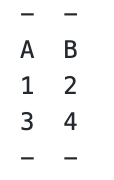 "
"
... and much more ...
Python Tabulate: Creating Beautiful Tables from Your Data:
https://www.pythoncentral.io/python-tabulate-creating-beautiful-tables-from-your-data/
"Tabulate is a Python library that transforms various data structures into formatted tables. It's designed to be simple, lightweight, and flexible, making it an excellent choice for displaying tabular data in terminals, markdown documents, or other text-based contexts."
"Installation:
https://www.pythoncentral.io/python-tabulate-creating-beautiful-tables-from-your-data/
"Tabulate is a Python library that transforms various data structures into formatted tables. It's designed to be simple, lightweight, and flexible, making it an excellent choice for displaying tabular data in terminals, markdown documents, or other text-based contexts."
"Installation:
# Install tabulate using pip pip install tabulateBasic Usage
"
"
Let's start with the most basic example:
from tabulate import tabulate # Sample data data = [ ["Alice", 24, "Engineer"], ["Bob", 32, "Doctor"], ["Charlie", 28, "Designer"] ] # Column headers headers = ["Name", "Age", "Profession"] # Generate table print(tabulate(data, headers=headers))
This basic example creates a simple table with three columns and three rows."
"Output:
Name      Age  Profession
------  -----  -----------
Alice      24  Engineer
Bob        32  Doctor
Charlie 28 Designer"Dyno Testing Cleveland Heads On A 347 Small-Block Ford
If you're building a small block Ford engine, consider using Cleveland style heads on your Windsor block. In this test, the 'Clevor' made a little more power across the entire RPM range, and the benefit increased as the RPM increased.
Monday, September 7, 2026
PC BIOS and Hardware Optimization Tips
Enable Intel XMP (or AMD EXPO) in BIOS for best memory performance.
Always use matched pairs of RAM sticks.
Install RAM inn the preferred slots first (check M/B manual).
Install GPU in correct slot - typically the 16-bit slot closest to the processor.
Use best (max) refresh rate for your monitor - easy change, but may reduce screen resolution.
Install games & other software on a fast SSD where possible.
Enable resizable BAR ...
Install fastest (or only) SSD in fastest M.2 slot (check M/B manual).
Leave at least 5% of an SSD's capacity available for system use ...
Provide appropriate cooling to avoid thermal throttling.
Ensure you're using chip-specific / GPU-specific drivers where available. Update often.
Check BIOS for updates monthly.
Reduce the # of startup & other apps / processes running in background. This can include RGB software for the M/B or GPU.
Don't disable the Windows Page File ...
Tuesday, September 1, 2026
ooRexx (Open Object Rexx) REXX interpreter
"Object REXX is a high-level, general-purpose, interpreted, object-oriented (class-based) programming language. Today it is generally referred to as ooRexx (short for Open Object Rexx), which is the maintained and direct open-source software successor to Object REXX.
It is a follow-on and a significant extension of the Rexx programming language (called here classic Rexx), retaining all the features and syntax while adding full object-oriented programming (OOP) abilities and other new enhancements. Following its classic Rexx influence, ooRexx is designed to be easy to learn, use, and maintain."
Open Object Rexx (ooRexx): the home for the products & projects associated with ooRexx:
Learning the REXX Language (may very significantly from ooRexx - need to check):
Open Object Rexx Tutorial: https://rexxinfo.org/tutorials/articles/oorexx_tutorial_by_hf.pdf
#3270, #MVS, #IBM, #REXX, #JCL, #TSO, #SPF
Haiku (operating system)
This OS has been suggested as a good fit for older laptops ...
Haiku, originally OpenBeOS, is a free and open-source operating system for personal computers. It is a community-driven continuation of BeOS and aims to be binary-compatible with it, but is largely a reimplementation with the exception of certain components like the Deskbar.[7] The Haiku project began in 2001, supported by the nonprofit Haiku Inc., and the operating system remains in beta.[8]
https://www.haiku-os.org/get-haiku/ <<==== Downloads
It looks like this is still an active project as of 2026 for x86 32-bit and 64-bit platforms:
DIY Battery Charging Station for Power Tools
A couple of different designs - try ideas from each:

This version includes mounting methods for a variety of chargers:

Sunday, August 30, 2026
Remington Model 1890 - Wikipedia
Originals come in 44.40 only:
https://en.wikipedia.org/wiki/Remington_Model_1890
https://en.wikipedia.org/wiki/Remington_Model_1890
“The Uberti 1890 revolvers are reproductions (but not exact copies) of the famous old Remington revolver, but chambered for more modern smokeless powder cartridges as the .357 Magnum …”
Thursday, August 27, 2026
PowerToys Window Hopper: single key jump between browser tabs & more
"... Window Hopper - a feature that's basically Alt + Tab but for switching between instances of a specific app.
You can activate Window Hopper by pressing Alt + backtick (that's the ` in the upper-left corner of your keyboard). Holding Alt and pressing backtick again cycles you through any open windows of the same app you're already in."
"Window Hopper works with any app that can have multiple windows open, including File Explorer.
I use separate browser windows for research, writing, Airtable, and Slack. I often have to snap these side-by-side or group them together. But being able to cycle between just the browser windows through a keyboard shortcut changes my workflow."
GitHub (this release): https://github.com/microsoft/PowerToys/releases/tag/v0.101.2362.0
"PowerToys 0.101 introduces Window Hopper for quickly moving between windows from the same app, a redesigned update experience with Stable and Insider channels, and compact mode for Command Palette." Explore other features here also.
PowerToys releases: https://github.com/microsoft/PowerToys/releases
DIY Thin Ripping Jig For Woodworking
This video presents a pretty simple design that is adaptable to specific saw tables and provides safe support when cutting thin pieces of wood:
Here's a different approach that also looks easy to build and use:
Amazon has quite a few pre-built jigs also:
Drill Press Angle Jig
This video shows how to build a nice jig to enable drilling angled holes on a drill press:
https://www.facebook.com/share/v/1Gj1j25fLZ/?mibextid=wwXIfr
Friday, August 21, 2026
Toyota V8 (1UZ) engine swaps make a lot of sense
From FB (American Cars Talk group):
"The 1UZ-FE's specifications include:
The engine fits where an LS fits because the 1UZ's external dimensions are nearly identical to a Gen III LS — a coincidence of engineering that makes adapter plates and motor mount fabrication straightforward.
"The 1UZ-FE's specifications include:
- All-aluminum block with cast-iron cylinder liners — similar to the LS.
- DOHC 32-valve heads — four valves per cylinder
- Six-bolt main bearing caps — the LS uses six bolts on its performance versions; the 1UZ had six bolts standard on every engine Toyota built from 1989 forward.
- Forged steel crankshaft.
- Forged steel connecting rods.
- Weight: 365 pounds complete with accessories — 35 pounds lighter than a dressed LS1 and 150 pounds lighter than a dressed 5.0 Windsor ... A hot rodder pulling a blown 5.0 from a Fox-body Mustang and installing a 1UZ gains 150 pounds of weight reduction from the engine swap alone — before touching the suspension, wheels, or body.
- Toyota designed the 1UZ to run at sustained high RPM in a luxury sedan for 200,000 miles without a rebuild. The result is a bottom end that holds 500 HP on stock internals with boost — supercharged 1UZ builds making 450 to 600 HP on factory crankshafts and rods are common in the drift and drag communities.
A CD009 six-speed manual transmission from a Nissan 350Z bolts up with an adapter for $500 to $800 — giving the 1UZ a modern six-speed manual that the original Lexus automatic never offered.
Rod Millen — the legendary New Zealand rally champion — built a 1932 Ford Roadster with a VVT-i 1UZ V8 that became one of the most famous hot rods at SEMA.
The engine swap community has documented 1UZ installations in Fox-body Mustangs, S13/S14 Nissans, Toyota AE86s, Mazda Miatas, Volvo 240s, BMW E30s, and at least one 1955 Chevrolet pickup. The engine fits where an LS fits because the 1UZ's external dimensions are nearly identical to a Gen III LS — a coincidence of engineering that makes adapter plates and motor mount fabrication straightforward.
The non-VVT-i version (1989-1997) is the one the swap community prefers — and the reason is the same reason the LBZ Duramax outsells the LMM: simplicity. The pre-1997 1UZ has no variable valve timing, no electronic throttle, and a standalone-friendly ECU that aftermarket companies like Megasquirt and Haltech can replace with a plug-and-play harness.
The timing belt — not a chain — requires replacement every 90,000 miles, which sounds like a maintenance burden until you consider that the non-interference design means a broken belt doesn't destroy the engine. A broken timing chain on an LS destroys it. The 1UZ's timing belt is a $200 maintenance event every 90,000 miles. The LS's timing chain is a $2,000 catastrophe if it fails.
The engine that Toyota designed offers 90 percent of the LS's performance at 30 percent of the junkyard cost, 85 percent of the weight, and zero percent of the timing chain anxiety."
KE Conversions (conversion parts): https://www.keconversions.com/shop/1uz/39
1UZ-FE FAQ ,Swap Guide For The 84-89 4runner and Pickup:
1996 Jeep Cherokee with a 1UZ-FE: https://engineswapdepot.com/?p=9003
Other 1UZ swaps: https://engineswapdepot.com/?s=1uz
1UZ Engine: The Bulletproof V8 That Lived Through Four Decades:
"The UZ engine family consists of three different engines, namely the 1UZ-FE (4.0-liter), 2UZ-FE (4.7-liter), 3UZ-FE (4.3-liter). The 1UZ launched the UZ family in 1989 and was specifically designed for the Lexus LS 400. Toyota's ambition here was to build a V8 that was quieter and lighter than anything BMW or Mercedes-Benz was manufacturing at the time. Of the three, the 1UZ is still the most celebrated of Lexus' UZ V8s."
Thursday, August 20, 2026
How to sync Apple Reminders with Microsoft To Do
- To get started, you're going to need a Microsoft account. If you've ever used Windows, Microsoft Office, or Outlook Online, you already have one, but if not, create an account here.
Log in to Microsoft To Do.
Create a task, so you can tell when the syncing is working.
With Microsoft To Do working, it's time to sync it with Apple's Reminders. Open System Settings on your Mac or Settings on your iPhone or iPad.
Click on Internet Accounts, then hit the Add Account button.
Click the Microsoft Exchange option.
Enter the email address and password for your Microsoft account. It will likely fail to log in and offer more details. Under User Name, put your email address. Under Internal URL and External URL enter
outlook.office365.com.
Note that, if your Microsoft account has two-factor authentication enabled, you're going to need to create an app password, or you won't be able to log in.Once you log in successfully, you'll be asked which services you want to sync. I recommend only syncing Reminders unless you specifically want the other services to sync.
You should be set now! Open Reminders on your device, and you'll see there's a new Exchange section, and that your tasks show up.
It's not perfect: new lists you add won't have the same name, for example. You can rename them quickly enough, though, after which everything should be working the way you expect. Any tasks you add to these lists will show up in Microsoft To Do, and any tasks you add in Microsoft To Do will show up here.
Note that you will have to repeat this process for all of your devices—adding your Microsoft account on your Mac doesn't add it on your iPhone, for example. Once you've set it up everywhere, however, you're done: everything will now sync without you having to pay attention.
Suggested Windows 11 apps to improve the user experience
This article suggests 5 apps including:
Another app that may be worth trying is:
UpNote is an elegant and powerful note app that works seamlessly across platforms: iOS, Mac and Windows.
 Write unlimited notes on iOS, Mac, Android, Windows and Linux
 Add attachments, tables, codes and more to your notes
 Protect your notes and notebooks with lock
 Elegant themes and notebook covers
 Export to text, PDF, HTML and Markdown formats
And a bunch of ToDo apps:
The 7 apps I always install first on a Windows 11 PC — and they're all FREE:
12 apps every Windows 11 power user should install on a new PC:
6 apps to fix Windows 11 and replace Microsoft's apps:
Wednesday, August 19, 2026
Use Exact Audio Copy (EAC) to rip CDs to a PC. It is a free app that is powerful & does the job right.
"... if you just want the same thing every time, EAC will run you through a setup wizard when you first use it. From there, you shouldn't need to touch your settings again."
"The only thing I did need to change was the metadata provider. The default option is only free for 10 rips, but you can change it within the app to MusicBrainz (https://musicbrainz.org/), which is completely free."
Perfect CD-ripping to FLAC with Exact Audio Copy (Setup & configuration):
"You might be prompted to install .NET Framework 3.5, if so go ahead and install this also."
Monday, August 17, 2026
FluentTaskScheduler - A modern Windows Task Scheduler built by a developer ...
Published March 8, 2026:
"FluentTaskScheduler is a free, open-source, non-Microsoft modern wrapper in a self-contained executable that uses the existing Task Scheduler API. Built with WinUI 3 on the Windows App SDK and powered by .NET 8, it preserves the reliability of the underlying system component while delivering a clean Fluent Design interface, improved monitoring tools, and advanced automation controls in a streamlined experience.
This is not a new scheduler engine. It is a better way to use the one Windows 11 already provides."
"One of the standout features is the built-in Script Library. Instead of embedding PowerShell code directly into every task, you can store reusable scripts centrally, reference the same script across multiple tasks, and keep automation login separate from scheduling configuration.This approach reduces duplication, simplifies maintenance, and encourages cleaner automation design.While the Script Library feature alone makes FluentTaskScheduler worth trying, I wasn’t able to figure out how to add new scripts during testing, which makes the tool feel a bit unfinished."
"FluentTaskScheduler integrates tightly with the operating system, meaning that it includes System Tray support, runs on startup, and provides toast notifications for successful or failed tasks.In addition, you can run this experience with the highest privileges, as SYSTEM, or under a specific user, and you can configure task priority from Realtime to Idle."
"This utility (wrapper) is not limited to its graphical interface. It includes CLI support for headless management and scripting.Since the tool is portable, you can use the command-line experience from Command Prompt from the path where the "FluentTaskScheduler.exe" is located."
" The FluentTaskScheduler is available for free as a self-contained executable that you can download directly from this GitHub page published by @TRGamer-tech."
FluentTaskScheduler ReadMe: https://github.com/TRGamer-tech/FluentTaskScheduler?tab=readme-ov-file
FluentTaskScheduler: The Modern Windows Task Scheduler Alternative for Windows 11:
FluentTaskScheduler for Windows: https://fluenttaskscheduler.en.softonic.com/
"The app targets routine automation such as scheduled reminders, launching maintenance scripts, and starting common executables on a cadence. Its design reduces the steps to create recurring jobs, which helps users replace manual calendar-based reminders or ad-hoc script launches with repeatable schedules. For people who routinely run the same task, this decreases setup friction and centralizes simple automations on the desktop."
FluentTaskScheduler: A Fluent UI Wrapper for Windows Task Scheduler (Portable & Free):
Sunday, August 16, 2026
How keyboard switches differ and how they impact user experience
"For professional typists or programmers, Tactile switches are a common ground between linear and clicky. They offer a small, noticeable bump at the actuation point without adding a loud click."
Saturday, August 15, 2026
Monday, August 10, 2026
[Article] Sharing your files between your iPhone ® and Windows PC - Microsoft Q&A
https://learn.microsoft.com/en-us/answers/questions/2338274/article-sharing-your-files-between-your-iphone-and
Saturday, August 8, 2026
Microsoft's Intelligent Terminal brings AI agents to the command line without changing the Windows Terminal experience
" Windows 11 has a new command-line terminal with AI agent integration, but don't worry, Microsoft's not adding AI to the Windows Terminal. Instead, the company forked the open-source terminal project and created a new tool known as "Intelligent Terminal.""
" The tool is being advertised as an assistant that you can use to explain errors, build commands, and troubleshoot issues without leaving the terminal to complete the research in other applications, such as the browser."
Linux gets Copilot app, & Microsoft didn't even make it
"Sure, you could use Copilot on the web. Heck, you could even open up Microsoft Edge for Linux and install Copilot as a PWA (Progressive Web App). But where is the fun in that?
Instead, you could install the unofficial Copilot app for Linux built by Hayden Barnes. The app opens the Copilot web app in a dedicated GTK window and keeps your login session safely on disk. It also integrates with the desktop for autostart, system downloads, app launcher execution, and accessing hardware permissions like the microphone.
Barnes shared the project on X alongside a link to the app's GitHub page."
A practical guide to reducing Windows 11’s visual clutter, etc.
"Windows 11 can feel loud and distracting out of the box — here are the features I disable immediately to make the OS calmer and easier to use."
Friday, August 7, 2026
DIY Spray Can Rack Plans
There are lots of variations possible for storing lubricants, chemicals, and paints that come in spray cans. These designs look easy to build and their size could easily be adjusted to your needs (NOTE: some wooden panels could be replaced with clear plastic to improve visibility of the products):
Thursday, July 30, 2026
Rust Conversion to a Protective Coating
3% Food grade (tannin) tannic acid powder, 10% phosphoric acid (Naval Jelly), mixed with distilled water.
Blue / black - bonded to the steel ...
Wednesday, July 29, 2026
Inexpensive DIY Metal Forge
A coffee can or similar container is lined with homemade heat-resistant foam ...
Sunday, July 26, 2026
Thursday, July 23, 2026
The Most Tuner-Friendly Cars You Can Buy – Road & Track
https://www.roadandtrack.com/rankings/g22514662/best-tuner-cars/
Cheapest Trucks for 2026 - R&T Picks for Affordable Pickups
https://www.roadandtrack.com/rankings/g45106198/cheapest-trucks/
At $26,400, the Slate Pickup Is a Bargain, but These 10 New Cars and SUVs Are Cheaper
https://www.motortrend.com/news/10-cars-and-suvs-cheaper-than-the-slate-pickup
Monday, July 20, 2026
25 Legitimately Fun Used Cars You Can Buy for Less Than $10,000
https://www.roadandtrack.com/rankings/g6684/fun-used-cars-under-10k/
Sunday, July 19, 2026
The handheld gaming boom accidentally created the cheapest SSDs on Earth (for now)
These make good (& fast) boot drives, especially for Linux, if the PC supports one or more NVME M.2 drives. https://www.makeuseof.com/the-handheld-console-boom-accidentally-created-the-cheapest-ssds-on-earth/
Saturday, July 18, 2026
Free CAD software for Woodworking
Best Free CAD for Woodworking: https://worldofwoodcraft.com/best-free-cad-for-woodworking/
"Some of the most popular options include SketchUp, Fusion 360, and LibreCAD. "
"... there are certain features that are particularly important for woodworking. For example, you’ll want a program that allows you to create and edit 3D models, as well as one that offers precise measurement tools."
"SketchList 3D: (https://sketchlist.com/) is a 14-day free trial CAD program that is specifically designed for woodworking. It offers a variety of tools and features that are tailored to the needs of woodworking enthusiasts, including the ability to create 3D models and templates. One of its standout features is the ability to generate cut lists and material layouts, which can save you a lot of time and effort."
"SketchUp Free: (Browser-based) is a popular choice for many woodworking enthusiasts. It offers a user-friendly interface that is easy to navigate, and it also provides a variety of tools and features to help you create 3D models and templates. One of its standout features is the ability to import and export files in a variety of formats, making it easy to work with other programs."
"Browser-based—no install needed. – 3D Warehouse for free woodworking components (e.g., hinges). – Exports 2D plans for table saw setups."
"FreeCAD: (Windows, macOS, Linux) is a powerful CAD program that is completely free to use. It offers a wide range of features and tools, including the ability to create 3D models and templates, and it also provides a user-friendly interface that is easy to navigate."
"... changes to sketches automatically update the entire model—ideal for iterative woodworking like adjusting table saw blade angles for dovetail joint layout."
"LibreCAD: (Windows, macOS, Linux) is another great option for woodworking enthusiasts. It is a free, open-source CAD program that offers a variety of tools and features to help you create 2D and 3D models. One of its standout features is the ability to import and export files in a variety of formats, making it easy to work with other programs. It also provides a user-friendly interface that is easy to navigate."
7 Best Free 3D CAD Program for Woodworking Projects:
https://toolsradar.com/7-best-free-3d-cad-program-for-woodworking-projects/
"Tinkercad: (Browser-based) Beginner-Friendly for Simple Wood Projects - uses drag-and-drop shapes for basic 3D design, perfect for hobbyists prototyping shelves or boxes without steep learning."
Free CAD software for makers: https://wayofwood.com/free-cad-software-for-makers/
This list includes suggestions for woodworking, 3D printing, and CNC work ...
7 Best Free CAD Software in 2024 (Beginner-Friendly):
https://www.3dsourced.com/3d-software/free-cad-software/
"Some of the most popular options include SketchUp, Fusion 360, and LibreCAD. "
"... there are certain features that are particularly important for woodworking. For example, you’ll want a program that allows you to create and edit 3D models, as well as one that offers precise measurement tools."
"SketchList 3D: (https://sketchlist.com/) is a 14-day free trial CAD program that is specifically designed for woodworking. It offers a variety of tools and features that are tailored to the needs of woodworking enthusiasts, including the ability to create 3D models and templates. One of its standout features is the ability to generate cut lists and material layouts, which can save you a lot of time and effort."
"SketchUp Free: (Browser-based) is a popular choice for many woodworking enthusiasts. It offers a user-friendly interface that is easy to navigate, and it also provides a variety of tools and features to help you create 3D models and templates. One of its standout features is the ability to import and export files in a variety of formats, making it easy to work with other programs."
"Browser-based—no install needed. – 3D Warehouse for free woodworking components (e.g., hinges). – Exports 2D plans for table saw setups."
"FreeCAD: (Windows, macOS, Linux) is a powerful CAD program that is completely free to use. It offers a wide range of features and tools, including the ability to create 3D models and templates, and it also provides a user-friendly interface that is easy to navigate."
"... changes to sketches automatically update the entire model—ideal for iterative woodworking like adjusting table saw blade angles for dovetail joint layout."
"LibreCAD: (Windows, macOS, Linux) is another great option for woodworking enthusiasts. It is a free, open-source CAD program that offers a variety of tools and features to help you create 2D and 3D models. One of its standout features is the ability to import and export files in a variety of formats, making it easy to work with other programs. It also provides a user-friendly interface that is easy to navigate."
7 Best Free 3D CAD Program for Woodworking Projects:
https://toolsradar.com/7-best-free-3d-cad-program-for-woodworking-projects/
"Tinkercad: (Browser-based) Beginner-Friendly for Simple Wood Projects - uses drag-and-drop shapes for basic 3D design, perfect for hobbyists prototyping shelves or boxes without steep learning."
Free CAD software for makers: https://wayofwood.com/free-cad-software-for-makers/
This list includes suggestions for woodworking, 3D printing, and CNC work ...
7 Best Free CAD Software in 2024 (Beginner-Friendly):
https://www.3dsourced.com/3d-software/free-cad-software/
Windows 11 Clipboard vs Edge Drop
"Edge Drop is a clipboard manager that can also be used for some light file management. It stays tucked away on the left side of your screen until you swipe your mouse over it or use a keyboard shortcut (Alt + C).
... Any item you copy on Windows 11 is added to Edge Drop by default. You can also drag items into Edge Drop."
"The developer of Edge Drop, AdiArtist, shared the app on Reddit. You can download Edge Drop through the app's website and read more about it on GitHub."
"Windows 11 already has a robust, built-in clipboard history that you can summon with Win + V. It supports pinning items, syncing across devices, and has been an integral part of my workflow for years. Even with Edge Drop installed, I'm not abandoning it.
Where Windows 11's clipboard is heavily keyboard-driven, Edge Drop is more built for the mouse."
Friday, July 17, 2026
Windows 11 recovery options
"Windows 11 has more recovery tools than ever, but choosing the right one can be confusing. Here's what each feature does and when to use it."
"Over the past several years, Microsoft has quietly transformed Windows 11 into a much more resilient operating system. Instead of relying on a single recovery option, the operating system now bundles a collection of tools designed to solve different types of problems. Some can repair Windows 11 while minimizing changes to your data. Others can roll back a problematic update, recover a computer that won't boot, or completely rebuild the system from the cloud.
The downside is that all these options can be confusing. Microsoft doesn't always make it clear which recovery feature you should use first, and many of them sound similar even though they solve different problems."
Wednesday, July 15, 2026
Why the free OpenVPN version is still the best choice for most users
"OpenVPN offers three modes of deployment with varied pricing based on the same underlying protocol. Here are the pros, cons, and costs associated with each."
"There are three versions:
- OpenVPN Community Edition - This remains the default community-maintained protocol where you configure everything yourself.
- Access Server - You're still responsible for setting up your own VPN servers, but management is easier thanks to a web-based UI.
- CloudConnexa - OpenVPN's full-service cloud version works just like any other paid VPN software."
Microsoft's new Windows 11 recovery tool is the ultimate Undo button - the Windows Resiliency Initiative
"Microsoft's new Windows 11 recovery tool is the ultimate Undo button - how to enable it
After a CrowdStrike update caused millions of Windows PCs worldwide to crash in July 2024, Microsoft announced the Windows Resiliency Initiative. The new Point-in-time Restore feature is a key part of that."
After a CrowdStrike update caused millions of Windows PCs worldwide to crash in July 2024, Microsoft announced the Windows Resiliency Initiative. The new Point-in-time Restore feature is a key part of that."
"ZDNET's key takeaways:
- The Point-in-time Restore feature is now available for all Windows editions.
- It takes daily snapshots of the system state to help recover from a serious problem.
- If your system drive is 200 GB or larger, the feature is on by default."
"This tool solves a problem as old as the PC itself. "I don't understand. It was working fine yesterday. Then I did [some seemingly innocuous thing] and now it's crashing." About that time, you desperately wish your keyboard had an Undo Today button.
That's Point-in-time Restore. It's one of those rare Microsoft features whose name perfectly describes its function. It rolls back your PC to a time when it was working properly, undoing everything that happened between then and now. Aside from ensuring that the feature is turned on, there's nothing else you have to do."
Sunday, July 12, 2026
15 Cheap 2000s Cars Quietly Becoming Collectible – Vehicle HQ
https://vehq.com/cheap-2000s-cars-becoming-collectible/
Saturday, July 11, 2026
2026 Tesla Model Y vs. 2026 Toyota bZ Comparison Test
Toyota is getting serious about electric cars:
"Surprisingly, Toyota's refreshed and renamed bZ has outsold every non-Tesla EV in America through the first quarter of 2026, though the Model Y remains entrenched atop the sales charts."
"Tesla's Full-Self Driving (Supervised) is included for the first 30 days and then costs $99 per month, but can be canceled at any time. Previously, it was an $8000 stand-alone option, so the subscription is a much better value."
"... the 2026 bZ adopts upgraded electric motors, new battery packs, and the NACS charge port that grants access to Tesla's vast Supercharger network; an improved 11.0-kW onboard charger makes Level 2 fill-ups less time-consuming too."
"Apart from lacking phone-mirroring functionality and traditional switchgear—at least there's a turn-signal stalk—Tesla's UX ranks among the best in the biz. Its menus are smartly organized, and functions are surprisingly intuitive (yes, even the power front-seat adjustments that live in the 15.4-inch center touchscreen). Plus, you can access popular apps such as Spotify and YouTube, and the navigation system is just as helpful as Google Maps or Waze."
Subscribe to:
Posts (Atom)