It’s interesting to see development in DOS to support information exchanges with Linux systems. https://github.com/fritzone/cloudy/?fbclid=IwdGRleAUonBxleHRuA2FlbQIxMQBwZG9mBWZkaWQWUPW1uGSjsb4nl5JFqLaiqDXUhxoiVXNydGMGYXBwX2lkCjY2Mjg1NjgzNzkAAR78OGLwM1Q_6HfbzrHE5FLN0ID25i9FaR77y3NezHO4kiF9vBYJbynbCTP9UQ_aem_ZwmqjQCPkzm9nWhB9b5DwQ
Tuesday, September 29, 2026

Monday, September 28, 2026
Saturday, September 26, 2026
Crafting Custom Work Tables For Radial Arm Saws: A Comprehensive Guide | ShunTool

https://shuntool.com/article/how-to-build-work-tables-for-radial-arm-saws
"The tabletop is a crucial component of your radial arm saw table. It provides a stable surface for cutting operations and is subject to frequent blade penetration. The ideal tabletop should be made of medium-density fiberboard (MDF) due to its durability, cost-effectiveness, and ease of handling. Plywood is another option but may splinter over time."
"The legs of your work table provide stability and balance. Typically, 2x4 lumber cut into equal lengths will serve as sturdy legs for your table."
"The frame of your work table provides structural integrity and supports the tabletop. It is typically constructed using 2x4 lumber for the length and 1x4 lumber for creating a lip around the tabletop edge."
"The fence is an essential component of your radial arm saw table, providing a guide for the material being cut. It should be installed perpendicular to the vertical plane of the saw blade when set to the cross-cutting position. A recommended material for the fence is a 2.5-inch wide piece of MDF set on edge, providing a straight and durable guide."

Radial Arm Saw Table Plans: Transforming Your Workspace (Crafting Efficiency)
https://toolsradar.com/radial-arm-saw-table-plans-transforming-your-workspace/
"What is the best height for a radial arm saw table in a garage shop?
Aim for 34-36 inches—elbow height when standing. Adjust ±2″ for your stature; my 5’10” frame loves 35″."
Radial Arm Saw Table Plans – Build Your Ultimate Custom Workstation
https://thejimbosliceworkshop.com/radial-arm-saw-table-plans/
"How do I ensure my fence is perfectly square?
To ensure your fence is perfectly square, unplug your saw. Lower the blade to the table surface. Use a high-quality machinist’s square or a known accurate framing square. Place one arm of the square against the blade (with teeth pointing away for safety) and the other against the fence. Adjust the fence until it is perfectly square to the blade’s travel path. Make test cuts on scrap material and measure for true squareness."
Setting Up a Radial Arm Saw : 13 Steps (with Pictures) - Instructables
https://www.instructables.com/Setting-Up-a-Radial-Arm-Saw/
"Power saws go out of alignment through the vibration that accompanies use. Also, radial arm saws do not like to be moved, and settings will probably drift when one is moved. But, a lot depends on how much precision the user is looking to have from his saw. If you plan to use the saw only to cut 2 x 4s to length, the accuracy you need is not the same as if you were doing fine cabinetmaking with the saw."

"This is my homemade stand constructed of 2 x 4 pieces and plywood cleats. I made it to take down easily, so the brace pieces attach with corner brackets and wood screws. I made two tool trays that rest on cleats inside the frame assemblies of the stand."
"Use a good square to check the travel of the blade so it is at 90 degrees to the fence. Pull the motor down the length of the arm. The blade should lightly touch the square the length of travel. Flip the square over and check from the other side of the blade, too."
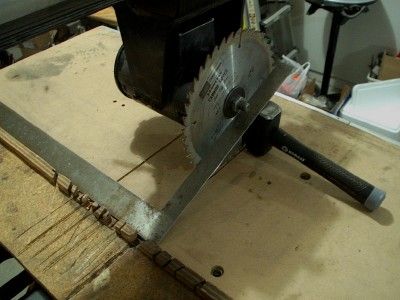
""Heel" means the blade moves through the wood cocked a little to one side. Heel results in burn marks on at least one side of the cut. You can also detect heel when the blade kicks up splinters as it exits the cut at the rear of the cut.
Use a framing square to check for heel. Set one leg against the fence. Bring the other leg against the saw blade. If there is no heel, the square and the saw blade will meet consistently from the front of the blade to the rear. If there is a "V"-shaped gap, the blade has some heel that will need to be removed."
Creating A Sturdy Fence For Your Radial Arm Saw: A Step-By-Step Guide | ShunTool
https://shuntool.com/article/how-to-make-a-fence-for-a-radial-arm-saw
"Materials needed:
- A piece of hardwood or plywood: The length and width of this piece will depend on the size of your radial arm saw. It should be long enough to provide ample support for your work-pieces and wide enough to accommodate the necessary accessories.
- T-track: T-track is a versatile and widely used accessory in woodworking. It consists of a metal track with a T-shaped slot that allows for easy attachment of various accessories, such as fence stops and hold-downs. You will need a length of T-track that matches the width of your fence.
- Bolts and nuts: You will need bolts and nuts to attach the T-track to the hardwood or plywood. Make sure to use bolts and nuts that are compatible with the T-track's mounting holes.
- Measuring tape or ruler: A measuring tape or ruler is necessary for accurately measuring and marking the positions of the T-track and other accessories."
Radial Arm Saw fence - new design - HomemadeTools.net
https://www.homemadetools.net/forum/radial-arm-saw-fence-new-design-39532
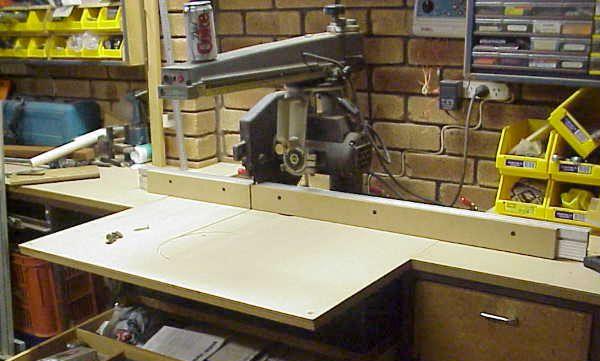
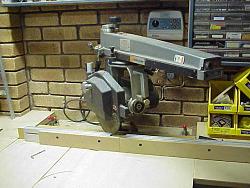
"The new fence design used a “sandwich” of MDF - aluminum extrusion - MDF. This provided some useful benefits."
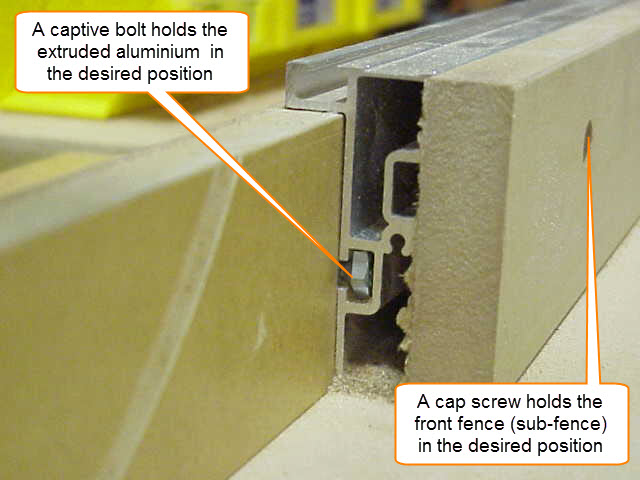
"Both the front piece of MDF (I suppose it could be called a sub-fence) and the aluminum extrusion could be moved and positioned separately. The extruded fence is held in the desired position with captive bolts and the sub-fence is held in place by cap screws. The piece of MDF at the back of the extrusion was the part of the fence that remained clamped to the table (and held the whole fence in place)."
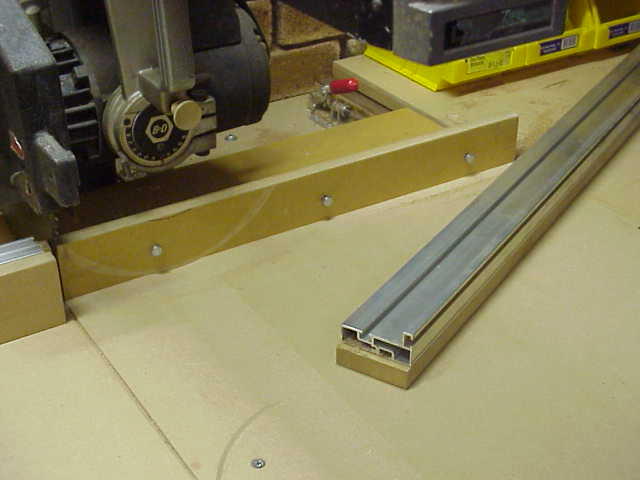
"As you can see in the image (below), the fence can be positioned to suit the angle being cut and the sub-fence could also be “closed” to allow the (MDF) sub-fence to be cut at the angle to which the arm was set, thus creating a zero clearance for the blade at that desired angle.
The extrusion was never cut. The extrusion was only re-positioned conveniently close to the blade to provide strengthening support to the MDF sub-fence.
Sunday, September 20, 2026
Saturday, September 19, 2026
Top 4 DIY Hand Tools to make for woodworking
https://www.facebook.com/share/v/1BmoJnJ6SY/
#1 a measuring stick you can lock into a specific measurement (Marking Gauge).
#2 Similar to #1, but with support for 45 degree angles, and a removable ruler (Routing Groove Jig).
#3 a sanding block.
#4 an easily centered Dowel Drilling Guide with support for corners or straight stock.
Wednesday, September 16, 2026
Grok is now in Copilot - xAI models are being added as subprocessors, giving users another choice in Word, Excel, &PowerPoint
"Microsoft Copilot will soon support Grok models from xAI. Word, Excel, and PowerPoint users in the Microsoft Frontier Program can test Grok models now, with general support expected to roll out in the future."
"Grok models are being added to Microsoft's Online Services Subprocessor list."
" Using Grok as a subprocessor helps Copilot tackle different tasks and provides redundancy that protects against outages or issues with other subprocessors."
"Once an admin enables the integration, you can set Copilot in apps like Word, Excel, and PowerPoint to automatically pick the best model for a task, or manually pick between GPT, Claude, or Grok directly from a drop-down menu in the interface."
Bringing modern USB xHCI support to Windows 98/ME/2K
Everything is open-sourced here if you want to jump right in to use it: https://github.com/yeokm1/xhci98.
"The USB host controller on most modern PCs today is based on the Extensible Host Controller Interface (xHCI) USB 3.0 standard. It was first publicly finalised by Intel in 2010 and is now the de facto standard superseding prior USB host standards. Updates to the standard have been provided over the years with the latest now at 1.2c.
Given its relatively recent introduction, only modern operating systems like Windows 8 onwards natively support it. Supporting older machines will require the chipset vendors to provide the driver stack which is the case back to Windows XP. What if we want to go back further?"
"I wanted to see if I could build a native xHCI driver for Windows 98. Especially with AI assistance today, this should be possible right?"
"usbport.sys is a USB 2.0-era design. It has no concept of SuperSpeed and neither does anything above it. Doing USB 3.0 properly would mean replacing the entire host controller driver (HCD) stack on the operating systems and I doubt many machines using those OSes would benefit from that speed anyway.
Fortunately every USB 3.0 connector also carries the USB 2.0 wires and xHCI exposes them as a separate logical port per connector. The driver manages those USB 2.0 ports and leaves the USB 3.0 ports unpowered. A SuperSpeed device upon not detecting any active USB 3.0 lines, then falls back onto the USB 2.0 pins of the same connector and runs at High-Speed. That is why the flash drive above benchmarks at USB 2.0 speed."
Monday, September 14, 2026
If I Had to Start Over, I’d Buy This Raspberry Pi – RaspberryTips
Pi Zero 2W - https://raspberrytips.com/buy-this-raspberry-pi/
"Overall, the Raspberry Pi Zero 2W is likely the best choice for most people at the moment. It hasn’t increased in price, and it’s strong enough for most Raspberry Pi projects. For just $15, you get a quad-core CPU (1 GHz), 512 MB of RAM, and Wi-Fi and Bluetooth.
The only drawback is that you’ll need a bunch of adapters to plug in any extra accessories (it doesn’t include the standard ports: mini HDMI and micro USB), and it’s only one of each."
"... check out your list of Raspberry projects that are a perfect fit for a Raspberry Pi Zero 2 and see if they align with your goals."
Saturday, September 12, 2026
10 useful Linux commands
https://www.howtogeek.com/these-linux-commands-showed-me-life-is-better-without-windows/
Brief examples of using the following commands:
"grep - Find anything instantly
find - Locate files with precision
APT, YUM/DNF, Pacman - Super-easy app installation
Piping - The power of combination
htop or top - Real-time process monitoring
Cron - Schedule automated backups
rename or loops - Bulk file management
curl or wget - Download through the command line
Alias - Create your own shortcuts
tmux - Break a single window into many screens"
Alpine is a Linux distro that fits in 200MB
Small by modern standards, but still useful:
https://www.howtogeek.com/the-smallest-linux-distro-thats-actually-worth-using-in-2026/
"When searching for a tiny distro, I looked at four things: download size, installed size, idle RAM, and how much time it took to do "normal" things."
"While the Standard and Extended ISOs are notably larger because they have more modules and firmware included, Alpine is still about an order of magnitude smaller than Ubuntu Server.
Critically, you get a normal package manager (APK) with a pretty robust repo to pull from. It isn't as extensive as what you get while running Debian, but it is more than enough."
"Alpine supports nearly every major architecture out there, including x86_64, aarch64, riscv64, and loongarch64. You can run GNOME, KDE Plasma, Xfce, Sway, and even System76’s COSMIC if you want a modern desktop.
I'm partial to KDE Plasma or XFCE depending on the hardware I'm working with."
"The biggest inconvenience I run into is compatibility issues with musl. Many apps, including many prebuilt binaries, like games, Electron apps, or proprietary drivers, assume you're using glibc (the C library found on most larger Linux distros.)
There are a few ways to get around it, like gcompat or Flatpaks, but you will encounter some apps that just won't run. In general, I haven't found it to be a significant problem."
8 things you should never do in Proxmox (unless you want your homelab to crash)
It does it’s own file management - don’t try to ‘help’:
https://www.howtogeek.com/things-should-never-do-in-proxmox-unless-want-homelab-to-crash/
Stop using the cd command — the Linux zoxide command is faster, smarter, and easier
https://www.howtogeek.com/stop-using-the-cd-command/
"The cd command is not a “search and find” tool. It doesn’t search for the specific directory you have in mind. Instead, it expects you to provide an absolute or relative path to the directory you want to navigate to."
"The modern Linux command in question is zoxide — a Rust-based alternative to the cd command that keeps track of the directories you visit and uses that information to help you jump back to them later. This way, instead of remembering a directory’s full path, you can just enter the destination directory, and zoxide will take you there."
"Once installed, zoxide maintains a database of directories you’ve visited and ranks them using frequency — a combination of frequency and recency. So, every time you visit a directory, it gets logged in the zoxide database and bumped up in the rankings the more you visit it. This allows zoxide to favor the directories you actually use most often rather than simply choosing the first matching path."
"The zoxide command won’t be immediately useful as soon as you install it. It first needs to learn which directories you visit so it can build its database, and that’ll take some time. However, you can speed up the process by directly adding the directories you know you visit frequently using the zoxide add command."
Check the comments with the article for some other ideas ...
Thursday, September 10, 2026
GPT-6 Astra - Wikipedia
This release is more powerful than, and perhaps more out of human control than previous AI models:
https://en.wikipedia.org/wiki/GPT-6_Astra
"GPT-6 is a family of large language models (LLM) developed by American artificial intelligence firm OpenAI. GPT-6 Astra was released to the general public on September 4, 2026, while GPT-6 Sol and GPT-6 Luna were released on September 22, 2026."
"The company also stated that GPT-6 Astra "is faster and capable of performing more tasks than any prior iteration" and better at staying focused, adhering to task boundaries, understanding user intent, handling tedious tasks, and completing multi-step workflows.
OpenAI has mentioned several examples of tasks GPT-6 Astra could perform, including filling out tax returns, building video game scenes, ordering food, and conducting job searches."
Tuesday, September 8, 2026
Using Tables with Python
Python can read data from tables and can be used to present (output) data in table format.
How to make a Table in Python? https://www.geeksforgeeks.org/python/how-to-make-a-table-in-python/
"Creating a table in Python involves structuring data into rows and columns for clear representation. Tables can be displayed in various formats, including plain text, grids or structured layouts. Python provides multiple ways to generate tables, depending on the complexity and data size."
"Tabulate module is the most efficient way to create tables. It offers various formatting styles, requires minimal code and automatically aligns data properly. This method is ideal for small to medium datasets where quick visualization is needed"
"Pandas library is a powerful tool for handling large datasets. It provides easy-to-use table structures with built-in functions for filtering, sorting and exporting data. While it adds some overhead, it is the best choice for working with structured data at scale."
"PrettyTable offers an easy way to generate well-formatted tables with a clean, readable structure. It allows for customization, such as column alignment and border styles, making it useful for reports and console applications."
"String formatting manually structures table data without any dependencies. While it gives full control over spacing and alignment, it lacks flexibility and automation, making it inefficient for large or dynamic datasets."
How to make a Table in Python? https://www.geeksforgeeks.org/python/how-to-make-a-table-in-python/
"Creating a table in Python involves structuring data into rows and columns for clear representation. Tables can be displayed in various formats, including plain text, grids or structured layouts. Python provides multiple ways to generate tables, depending on the complexity and data size."
"Tabulate module is the most efficient way to create tables. It offers various formatting styles, requires minimal code and automatically aligns data properly. This method is ideal for small to medium datasets where quick visualization is needed"
"Pandas library is a powerful tool for handling large datasets. It provides easy-to-use table structures with built-in functions for filtering, sorting and exporting data. While it adds some overhead, it is the best choice for working with structured data at scale."
"PrettyTable offers an easy way to generate well-formatted tables with a clean, readable structure. It allows for customization, such as column alignment and border styles, making it useful for reports and console applications."
"String formatting manually structures table data without any dependencies. While it gives full control over spacing and alignment, it lacks flexibility and automation, making it inefficient for large or dynamic datasets."
Python can read data from tables and can be used to present (output) data in table format.
Read And Write Tabular Data using Pandas:
Read And Write Tabular Data using Pandas:
https://www.geeksforgeeks.org/pandas/read-and-write-tabular-data-using-pandas/
Pandas read_table() function:
Pandas read_table() function:
https://www.geeksforgeeks.org/python/pandas-read_table-function/
Good examples here ...
pandas.read_table https://pandas.pydata.org/docs/reference/api/pandas.read_table.html
Detailed syntax ...
Python Pandas - read_table() Method:
Good examples here ...
pandas.read_table https://pandas.pydata.org/docs/reference/api/pandas.read_table.html
Detailed syntax ...
Python Pandas - read_table() Method:
https://www.tutorialspoint.com/python_pandas/python_pandas_read_table_method.htm
"The read_table() method in Python's Pandas library is used to read data from a general delimited (including TSVs, CSVs, and other delimited formats) text file into a Pandas DataFrame. It provides flexible options for parsing data from various storage back-ends, including local files, URLs, and cloud storage services. It also supports various delimiters and file formats, making it ideal for handling structured data for analysis tasks."
Pandas read_table — Read general delimited file into DataFrame:
https://www.askpython.com/python-modules/pandas/pandas-read-table
Parsing Tables From Text Files:
https://codesignal.com/learn/courses/parsing-table-data/lessons/parsing-tables-from-text-files
Using Python with MS-Word Tables:
"The read_table() method in Python's Pandas library is used to read data from a general delimited (including TSVs, CSVs, and other delimited formats) text file into a Pandas DataFrame. It provides flexible options for parsing data from various storage back-ends, including local files, URLs, and cloud storage services. It also supports various delimiters and file formats, making it ideal for handling structured data for analysis tasks."
Pandas read_table — Read general delimited file into DataFrame:
https://www.askpython.com/python-modules/pandas/pandas-read-table
Parsing Tables From Text Files:
https://codesignal.com/learn/courses/parsing-table-data/lessons/parsing-tables-from-text-files
Using Python with MS-Word Tables:
https://python-docx.readthedocs.io/en/latest/user/tables.html
"Word provides sophisticated capabilities to create tables. As usual, this power comes with additional conceptual complexity.
This complexity becomes most apparent when reading tables ..."
"Word provides sophisticated capabilities to create tables. As usual, this power comes with additional conceptual complexity.
This complexity becomes most apparent when reading tables ..."
Creating Tables With Tabulate: https://datagy.io/create-table-in-python-tabulate/
"How to Display Data in a Table Format in Python
"How to Display Data in a Table Format in Python
- Import the tabulate function from tabulate
Run the following code
from tabulate import tabulate - Pass your data (such as a list of lists) into the tabulate function
Pass a data structure into the function, such as this:
data = [['A', 'B'], [1, 2], [3, 4]]result = tabulate(data) - Print your resulting table
To print the data, print out your resulting table using
print(result)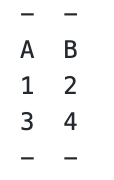 "
"
... and much more ...
Python Tabulate: Creating Beautiful Tables from Your Data:
https://www.pythoncentral.io/python-tabulate-creating-beautiful-tables-from-your-data/
"Tabulate is a Python library that transforms various data structures into formatted tables. It's designed to be simple, lightweight, and flexible, making it an excellent choice for displaying tabular data in terminals, markdown documents, or other text-based contexts."
"Installation:
https://www.pythoncentral.io/python-tabulate-creating-beautiful-tables-from-your-data/
"Tabulate is a Python library that transforms various data structures into formatted tables. It's designed to be simple, lightweight, and flexible, making it an excellent choice for displaying tabular data in terminals, markdown documents, or other text-based contexts."
"Installation:
# Install tabulate using pip pip install tabulateBasic Usage
"
"
Let's start with the most basic example:
from tabulate import tabulate # Sample data data = [ ["Alice", 24, "Engineer"], ["Bob", 32, "Doctor"], ["Charlie", 28, "Designer"] ] # Column headers headers = ["Name", "Age", "Profession"] # Generate table print(tabulate(data, headers=headers))
This basic example creates a simple table with three columns and three rows."
"Output:
Name      Age  Profession
------  -----  -----------
Alice      24  Engineer
Bob        32  Doctor
Charlie 28 Designer"Dyno Testing Cleveland Heads On A 347 Small-Block Ford
If you're building a small block Ford engine, consider using Cleveland style heads on your Windsor block. In this test, the 'Clevor' made a little more power across the entire RPM range, and the benefit increased as the RPM increased.
Monday, September 7, 2026
PC BIOS and Hardware Optimization Tips
Enable Intel XMP (or AMD EXPO) in BIOS for best memory performance.
Always use matched pairs of RAM sticks.
Install RAM inn the preferred slots first (check M/B manual).
Install GPU in correct slot - typically the 16-bit slot closest to the processor.
Use best (max) refresh rate for your monitor - easy change, but may reduce screen resolution.
Install games & other software on a fast SSD where possible.
Enable resizable BAR ...
Install fastest (or only) SSD in fastest M.2 slot (check M/B manual).
Leave at least 5% of an SSD's capacity available for system use ...
Provide appropriate cooling to avoid thermal throttling.
Ensure you're using chip-specific / GPU-specific drivers where available. Update often.
Check BIOS for updates monthly.
Reduce the # of startup & other apps / processes running in background. This can include RGB software for the M/B or GPU.
Don't disable the Windows Page File ...
Tuesday, September 1, 2026
ooRexx (Open Object Rexx) REXX interpreter
"Object REXX is a high-level, general-purpose, interpreted, object-oriented (class-based) programming language. Today it is generally referred to as ooRexx (short for Open Object Rexx), which is the maintained and direct open-source software successor to Object REXX.
It is a follow-on and a significant extension of the Rexx programming language (called here classic Rexx), retaining all the features and syntax while adding full object-oriented programming (OOP) abilities and other new enhancements. Following its classic Rexx influence, ooRexx is designed to be easy to learn, use, and maintain."
Open Object Rexx (ooRexx): the home for the products & projects associated with ooRexx:
Learning the REXX Language (may very significantly from ooRexx - need to check):
Open Object Rexx Tutorial: https://rexxinfo.org/tutorials/articles/oorexx_tutorial_by_hf.pdf
#3270, #MVS, #IBM, #REXX, #JCL, #TSO, #SPF
Haiku (operating system)
This OS has been suggested as a good fit for older laptops ...
Haiku, originally OpenBeOS, is a free and open-source operating system for personal computers. It is a community-driven continuation of BeOS and aims to be binary-compatible with it, but is largely a reimplementation with the exception of certain components like the Deskbar.[7] The Haiku project began in 2001, supported by the nonprofit Haiku Inc., and the operating system remains in beta.[8]
https://www.haiku-os.org/get-haiku/ <<==== Downloads
It looks like this is still an active project as of 2026 for x86 32-bit and 64-bit platforms:
DIY Battery Charging Station for Power Tools
A couple of different designs - try ideas from each:

This version includes mounting methods for a variety of chargers:

Subscribe to:
Posts (Atom)